
Social Media Guide helping you connect to Social Networks: Twitter, Facebook, Google, LinkedIn, YouTube using social media

Setup a Custom Landing Page for Your Facebook Page

Facebook, Social Media — By Matthew Tommasi on November 1, 2009 at 4:17 pm


facebook logo

So you have finally gotten around to creating a page for your business or club on Facebook.

You have secured a vanity URL and your blog’s posts are automatically being pulled into and displayed on your Facebook page.

Now what?

Why not set up your own custom landing page?

If you haven’t heard of a landing page before, it is the page on a website that you arrive on.. or land on.

When someone browses to your Facebook fan page for the first time, the landing page is page that is displayed to them.

Facebook allows you to configure landing pages for new visitors (ie non-fans), so that they land on that custom page instead of your wall.

The goal of the landing page is to convert new visitors into fans by providing them with information that makes them want to become a fan.

This guide will show you how to set up a custom landing page.

Add the Static FBML Application

Login to your Facebook account.

At the bottom left of your screen (in the status bar), click on Applications,

applications

Then click on Browse More Applications,

browse more apps

In the search box type in FBML,

FBML

Click on Static FBML,

static FBML

Click on Add to my Page,

add to my page

Select your page and click <Add to Page>,

add to page

Settings

Now return to your Facebook page and click on Edit Page,

edit page

Scroll down to the FBML application, click on the Pencil icon.. then select Edit,
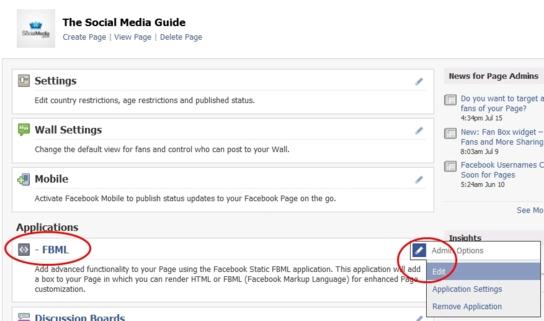
edit FBML

In the Box Title enter a name for your custom tab.. then paste in your HTML code that points to your images, files etc.

My custom landing page consists of

When you are done click on <Save Changes>,

add code

Click on Edit Page again,

edit page

.. and go back to the FBML Application Settings,
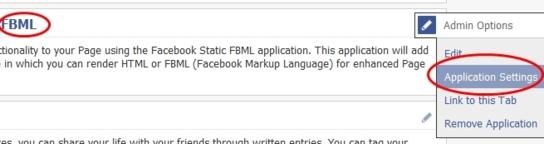
FBML applicaiton settings

Ensure this application has been added to your Tabs,

add to tab

Default Landing Page

Now to make this page the default landing page for non-fans.

In Wall Settings, click on the Pencil icon.. then select Edit,

edit wall settings

For the Default Landing Tab for Everyone Else option.. select the tab that you have just created,

default landing tab

Now log out of Facebook,

logoutNow head back to your Facebook fan page,

fan page

You will now land on your new custom landing page,

new landing page_

Finally..

If you liked this post please register to receive The Social Media Guide’s free newsletter that’s packed with tips, guides and more!

Most of these posts are available to download for free as PDFs for registered members.

Please help spread the word by becoming a fan of The Social Media Guide on Facebook,

fan

And following me on Twitter,

Enjoy!

shareit


  • Share/Bookmark
Tags: facebook, guide, how, instructions, social media
  • Hi, my default landing tab was changed as per your instructions and worked for a while. Now, it only works for someone who is Not logged in (I'm referring to non-admins). If they are logged in, they are getting to the wall instead of the default tab. Any ideas what may have changed int he last few days?
  • Hi

    Yes this is the expected behaviour.

    If you change the default landing page as per this post.. then this is the page non-fans will land on (whether they are logged in or not).

    If you are already logged into FB, and are already a fan.. then you will be directed to the Wall.

    Matt


    --------------------------------------------------
  • ucomeau
    This is an awesome post! Thank you so much for sharing - I've been looking for this info, and this gives me a great head start!
  • Thanks very much for the comment!


    ________________________
  • This article is awesome, thank you for showing a visual step by step for creating your own landing page. FB certainly doesn't make it easy to figure out on your own.

    Thanks Again,
  • No worries mate.. I'm really glad it helped you somewhat.

    Thanks for the comment!

    --------------------------------------------------
  • A very useful trick to improve your Facebook profile. Have done this to two different profiles already. Many thanks for posting this tut, Matt!
  • No worries mate thanks for the comment.


    ________________________
  • Mike
    Hey Matt, I am kind of new to this. I entered the code from above (only changed the company name). For some reason the image that I designed is not showing up. Any ideas?
  • Hi Mike

    Where about's is your image located? eg, Have you uploaded it to your webserver?

    Have a look in my code screenshot and you will see the URL of where my image is located (on my webserver).

    You will need to add the URL of where your image is, in your code.

    Hope that helps.

    Cheers
    Matt
  • Awesome post thanks for the info I had no idea how to set a business profile on facebook.
  • Tina
    Hi Matt,
    I have a question - is it possible to include a Cool Iris code on a Fan Page with the FBML function?
    Thanks!
  • Hi Tina

    I honestly don't know. But if you find out it can be done please let me know!!

    Cheers
    Matt


    ________________________
  • Hey Matt,

    you have done it .....i was busy writing an article wrt FBML ( but to my surprise you have already done it ) Great work !
  • cheryl
    I have my vanity URL already:

    http://www.facebook.com/blissweddingsmarketfavors

    When I am logged into FB and access the URL above, it works and I am
    redirected to my wall. But if I am logged OUT of FB and try to access
    that same URL, I am redirected to the FB login page. For the life of me,
    I cannot figure out why this is happening. I should be redirected to my default landing page (the wall).

    For example, I am logged out of FB right now and when I type: http://www.facebook.com/cocacola I am taken to their landing page.

    So, I don't know why I cannot see my landing page. Do I need to have a certain
    number of fans or something?

    Oh, I hope you can provide any insight. I am pulling my hair out! :)

    Thanks,
    Cheryl
  • Hi Cheryl

    Is your custom URL for your personal FB profile, or is it for your FB page?

    If it is for your personal profile then when you browse to it whilst logged out, you will be directed to the FB login page.

    If this URL is for your FB page then when you browse to it whilst logged out, you will be directed to your default landing page.

    Hope that helps.

    Cheers
    Matt


    ________________________
  • cheryl
    Hi, Matt

    Thanks SO much for your reply. That URL is for my business FB page. That is why I am so confused. I should be directed to my default landing page. I created the FB page with a work email address rather than with my personal email address. I didn't want to link my personal FB profile and business FB page linked. But after I created the business FB page, I was reading someplace that you must use your personal account in order to create a business FB page. Did I understand that correctly? If that is not correct, you think that is the problem? Thanks again, Cheryl
  • Hi Cheryl

    When I created my FB page I did it from my FB profile.

    If I understand you correctly you created a FB page by itself without linking to it from your FB personal profile?

    If that is the case (and you want to keep these two separate) maybe try and create an 'empty' FB profile that is associated with your page. I'm not sure but that may work.

    Either way I would have thought that if you had a FB page you would land on the default page regardless of whether it was associated with a profile or not.

    Let me know how you go.

    Matt


    ________________________
  • cheryl
    Hi, Matt

    Thanks SO much for your reply. That URL is for my business FB page. That is why I am so confused. I should be directed to my default landing page. I created the FB page with a work email address rather than with my personal email address. I didn't want to link my personal FB profile and business FB page linked. But after I created the business FB page, I was reading someplace that you must use your personal account in order to create a business FB page. Did I understand that correctly? If that is not correct, you think that is the problem? Thanks again, Cheryl
  • cheryl
    I have my vanity URL already:

    http://www.facebook.com/blissweddingsmarketfavors

    When I am logged into FB and access the URL above, it works and I am
    redirected to my wall. But if I am logged OUT of FB and try to access
    that same URL, I am redirected to the FB login page. For the life of me,
    I cannot figure out why this is happening. I should be redirected to my default landing page (the wall).

    For example, I am logged out of FB right now and when I type: http://www.facebook.com/cocacola I am taken to their landing page.

    So, I don't know why I cannot see my landing page. Do I need to have a certain
    number of fans or something?

    Oh, I hope you can provide any insight. I am pulling my hair out! :)

    Thanks,
    Cheryl
  • israelmeneses
  • Cheryl,
    I noticed you got your page "About Us" working as your landing page, how did you manage to get it to work? I followed every step on this page with no success, no offense Matt!! any one can help?

    I have created my page and changed setting for wall to that "promos" FB page.

    Thanks
  • Hi Israel

    Was there anything wrong with the actual process of setting up the custom landing page (in my post), or unclear?

    I am open to all feedback, and could possibly amend this post if need be.

    Cheers
    Matt

    ________________________
  • Great info and very helpful!

    Thanks a lot Matthew!
  • Thanks for the comment Israel.


    ________________________
  • very useful, thanks!
  • Thx for the comment!

    --------------------------------------------------
  • great post....if anyone is interested i wrote a tutorial on building custom Facebook pages http://dropthedigibomb.com/2009/an-introduction...

    btw, love the cheat sheets guys, keep'em comming...
  • Great tutorial on FBML!


    --------------------------------------------------
  • digibomb
    thanks!
  • Thank you for the comment.


    ________________________
  • gwyn
    I don't know HTML so how can I format my "welcome" page? Need to bold the headline, and separate paragraphs. Would also be great to add something so they can sign up to be on a newsletter mailing list.

    PS Love the book!
  • If you don't know HTML, then you can still use programs like Dreamweaver,
    etc and then grab then HTML that it generates and paste it in that way.

    I use AWeber for my newsletter and you can create your own newsletter
    sign-up form.. once that is created then you just copy and paste the HTML
    into your landing page.


    --------------------------------------------------
  • gwyn
    Unfortunately I don't know any programming stuff. Is there any other solution?
  • help pls..... when i get to {add to Page} it shows "No Results"...?
  • I'm having some trouble... when I get to {add to Page} it shows No results...?
  • Have you created a Facebook page?

    http://thesocialmediaguide.com.au/2009/07/01/cr...

    It looks like from what I can see you account is a FB profile, not a FB page ?
  • thanks for that, your absolutely right. i'll have to recreate a FB page. it there an easy way to transfer all the people that are now added as friends on the FB profile without having to manually re-add them again once the FB page is set up?
    or maybe I can run them both concurrently....
  • No, you can't transfer friends from your personal FB profile to your FB
    page..

    Once your page is setup.. people then become "fans" of your
    product/service..


    --------------------------------------------------
blog comments powered by Disqus
Copy Protected by Chetan's WP-CopyProtect.